
PlateOS™ · Free iPhone beta
Know what's ready to train.
PlateOS is a workout log for people who lift. A ring around your guide shows how tired each muscle group is, from what you've logged. You get a suggested workout, and you can log sets without unlocking your phone.
- Ready
- Tomorrow
- Tired
- Untrained
Free for testers. Places are limited. iPhone only.
UK only for now.

How it works
Three simple steps. Nothing to set up first.
Pick a workout
Start a live session, or plan a workout. Suggested workouts and plans are there if you want them.
Log each set
Tap it in, or log it from the Lock Screen. PlateOS learns how long you usually rest.
See what's ready
Today shows which muscles are ready, which need a day, and what to train next.
Log your workout effortlessly, however you like.
Your next set is always one tap away: on your Lock Screen, in the Dynamic Island, or on your wrist.
-

Apple Watch
Log sets and start your rest from your wrist.
-
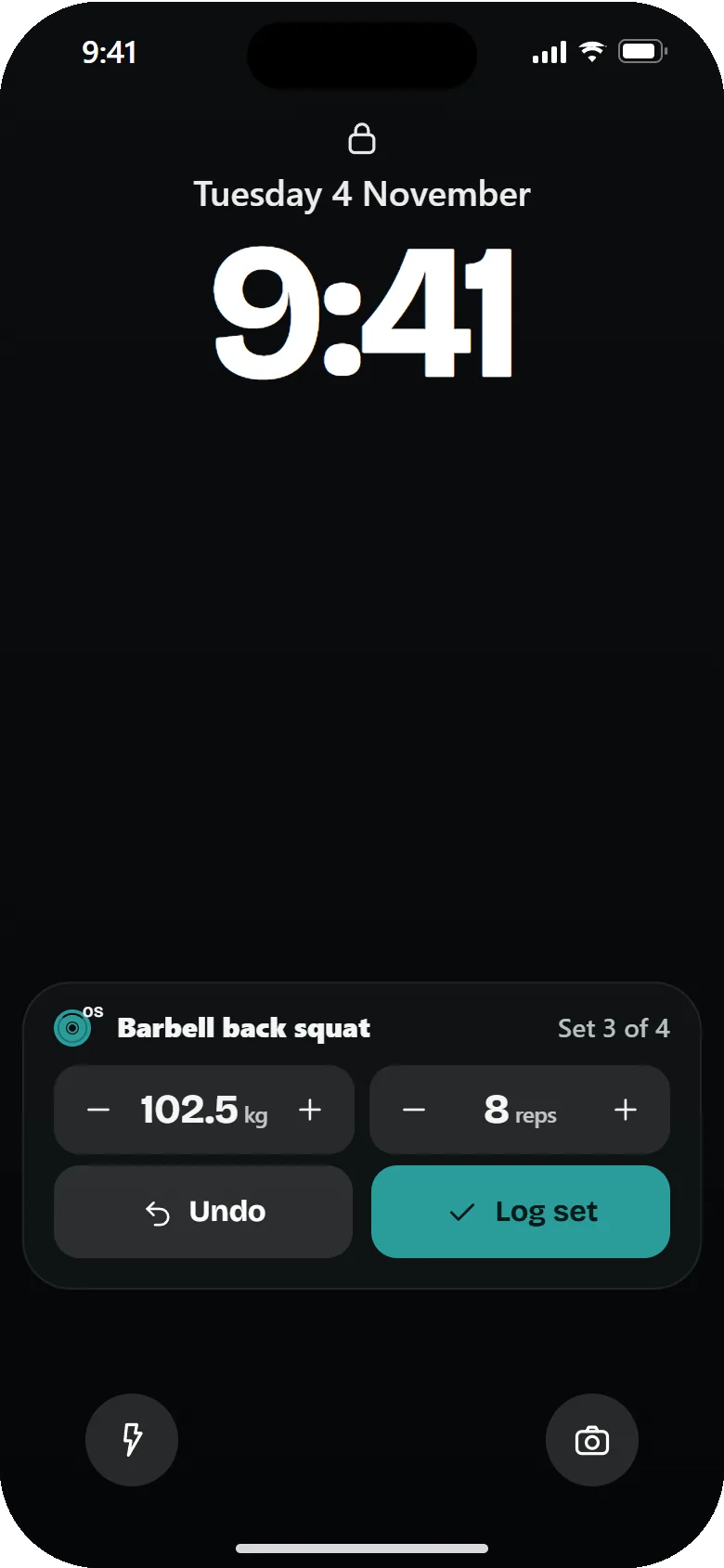
Log without unlocking
Your next set is right there on the Lock Screen. Change the weight and reps, tap Log set, and get on with your lift.
-

Dynamic Island
See your rest countdown on the Dynamic Island and log from the Lock Screen.
-
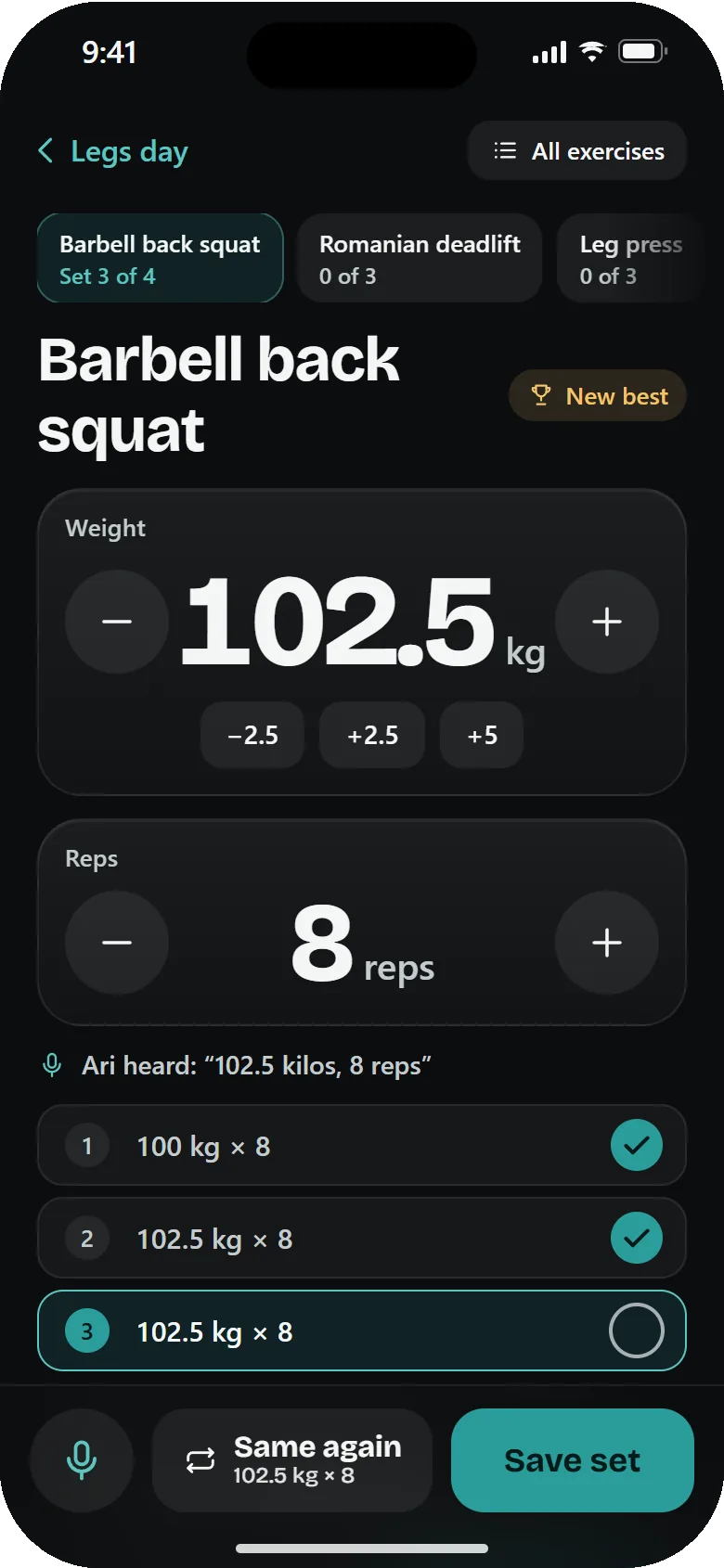
Log in the app
Pick the exercise, set the weight and reps, and tap Save set. Your whole session in one place.


The squat guide
See the squat done right.
The guide shows the back squat done well, and what to avoid.
Meet Otis, your PlateOS companion: the figure that shows how each exercise is done and how recovered each muscle is. A little play on the OS in PlateOS.
More lifts
One guide, lift after lift.
The squat is just the start. The app already has guide videos for about 20 lifts, and written guides for 76 exercises: set-up, what to do and what to avoid.
Machines are next. This is a first look at one cable machine used for several exercises. Machine guides are still being built.
Your data stays yours.
Short version: we ask for little and keep it close.
Apple Health stays on your phone
It's all optional. Anything PlateOS reads from Apple Health stays on your iPhone.
Your voice stays on your phone
Voice is optional. If you use it, audio never leaves your iPhone.
No ads, no tracking
No ads, no analytics and no tracking tools. This website has none either.
Delete it any time
You can delete your account and data inside the app.
Questions
Where is PlateOS available?
The beta is for people in the UK only for now. We plan to open it to more countries later.
Is it free?
Yes. The beta is free for every tester. Places are limited.
What do I need?
An iPhone and Apple's free TestFlight app. We'll walk you through it.
Is it finished?
No. It's an early beta, so things will change and some will break. Builds expire after 90 days. We're starting in the UK.
Do I have to use my voice?
No. You can tap in your sets. Voice is optional, and audio never leaves your phone.
Do I need an account?
Yes, to start. You can sign in with Apple, Google or an email code. You can delete your account and data inside the app.
What about Apple Health?
It's optional. PlateOS can read workouts, calories and body weight, and save your workouts and body weight to Health. What it reads stays on your phone.
Do you track me?
No. There are no ads, no analytics and no tracking tools in the app. This website has no cookies or trackers either.
Which lifts have guides?
The back squat is shown here. The app has guide videos for about 20 lifts.
Ready to try it?
Join the free iPhone beta. Places are limited.